Reflective satellites may be the future of high-end encryption

Reflective satellites may be the future of high-end encryption

Quantum key distribution is regularly touted as the encryption of the future. While the keys are exchanged on an insecure channel, the laws of physics provide a guarantee that two parties can exchange a secret key without knowing whether they’re being overheard. This unencrypted-but-secure form of key exchange circumvents one of the potential shortcomings of some forms of public key systems.

However, quantum key distribution (QKD) has one big downside: the two parties need to have a direct link to each other. So, for instance, banks in and around Geneva use dedicated fiber links to perform QKD, but they can only do this because the link distance is less than 100km. These fixed and short links are an expensive solution. A more flexible solution is required if QKD is going to be used for more general encryption purposes.

A group of Italian researchers have demonstrated the possibility of QKD via a satellite, which in principle (but not in practice) means that any two parties with a view of a satellite can exchange keys.

Why QKD?

We live in a world where quantum computing is looming as a viable tool, one that could make current means of encryption obsolete. More secure forms of cryptography are becoming increasingly important. Even now, researchers contemplate a world where various agencies store some intercepted encrypted communication under the assumption that one day they will have sufficient computational power to decode them.

Ars readers know that most security breaches are not due to a failure of encryption; rather they are enabled by poor security practices. However, I think it is fair to say that the exfiltrated data is more accessible due to poor encryption practices. And, once encrypted data has been exfiltrated, it simply awaits the requisite computational power to decode it.

This expectation—that encrypted data can be decrypted in the near future—comes from the fact that many cryptographic algorithms rely on an assumption of mathematical difficulty for their security. The validity of this assumption relies on some deep ideas about how mathematical problems can be solved.

Specifically, the mathematical assumptions that underlie public key exchange are under attack. The most commonly used algorithms are based on the computational complexity of finding prime factors of large numbers. But a quantum computer can solve this problem in far fewer steps than a classical computer. Indeed, the scaling of Shor’s algorithm—this is the quantum version of an algorithm for finding prime factors—is so favorable that it is expected that a practical quantum computer will render all encryption methods based on prime factors useless.

This is one reason why QKD is so attractive for certain people: the keys are secret and are exchanged in a way that allows one to ensure that it cannot be intercepted during exchange. Thus, an attacker is always forced to guess the key (rather than use the public part of the key to compute the secret part of the key). Any brute force attack must be performed without even knowing the length of the key or how often a new key is used.

You might argue that an assumption of QKD is that the laws of physics are correct. Science makes a big deal about how we can only get an increasingly accurate approximation of the truth, so surely this assumption is as suspect as the mathematical ones made for classical cryptography? Well, no, not really. Even if we were to discover some deeper theory than quantum mechanics, that theory must still replicate all the experimental results of quantum theory, and this includes the ones on which QKD are based. So this assumption is a fairly safe one.

In space, no one can hear your key exchange

In terms of technology, QKD is very close to being suitable for widespread use—though by “use” I mean communication between data centers, rather than for home use. The hurdle, as I stated in the introduction, is that the link must be directly between two parties, which limits us to about 100km via fiber.

There, has, however, been a rather strong push to develop free-space QKD, and this has now gone critical with the tests that show QKD via satellite is possible. In order to do this, the researchers made use of laser ranging satellites, which have corner cube mirrors mounted on them. The corner cube mirrors are retro-reflectors, so any signal that arrives gets sent back in the direction that it came from. More importantly, corner cube reflectors normally preserve polarization, which is commonly used to carry data.

So, as long as the signal arrives at your detector, then you should be able to generate a key using lasers bounced off this satellite.

Getting a signal is, unfortunately, no easy task. First, you need a clock signal to tell you when to measure—the properties of the atmosphere and the relative motion between the sender, detector, and satellite mean that you can’t rely on local timing. The clock takes the form of a powerful, let-me-fry-your-eyes laser, emitting 10 pulses per second. The actual qubits (quantum bits) are sent at 100 MHz, with every 105th pulse synchronized with the clock signal. These pulses are emitted and collected by a 1.5m telescope.

The researchers compared the polarization states they detected to the pulses of light they sent. They determined that the newer satellites did preserve polarization, while older satellites generated more errors, possibly because the coatings on the reflectors had been damaged over time (the older satellites are 15 to 20 years old). For the researchers, this showed that the error rate was low enough that a key could be shared via quantum states. But, at this point I was extremely skeptical.

QKD security is only guaranteed if the source emits single photons, since those get altered by any eavesdropping. But, in this system, the receiver gets single photons, while each pulse contains 1.3 billion photons when it exits the telescope. You would think that this renders the result useless. An eavesdropper can, by tapping a tiny fraction of the signal emitted from the telescope, obtain every bit sent without the knowledge of either sender or receiver.

The standard QKD protocol involves revealing how each measurement was performed. While only the sender knows which polarization state was sent, everyone (including an eavesdropper) knows how the measurement was performed. If only the sender and receiver know the results of the measurements, the key is secure.

It is the first and last bit of hidden knowledge—the bits sent and the measurement results—that keeps the key secret. On the face of it, in this scheme, anyone can know what polarization state was sent if they can simply snag one of those 1.3 billion photons. Everyone knows how the measurement was performed; therefore, everyone knows what the measurement results were. No secrets are kept in this situation.

However, the researchers realize this and have an alternative protocol. In their approach, the satellite would contain optics that would modify the polarization of the light at the satellite. Since the reflected signal is at the single photon level, interception after this point is detectable. Therefore, all is well, right?

The key is to make sure that the polarization state sent to the satellite does not reveal the polarization state reflected from the satellite. This can be done by sending pulses of light that are circularly polarized. This can be filtered to two pairs of linearly polarized states at the satellite (under the control of the sender). Now, the sender knows which states were sent, everyone knows how the measurements were performed, and, only the sender and receiver know the results of the measurements. This meets the requirements for QKD, but only under the condition that the control signal sent to the satellite remains secure.

This later point seems like a pretty serious weakness. A solution might be to have two identical pseudo random number generators and initiate both with the same seed at the beginning of the key generation process. But you really need to ensure that the random number generator is protected or that the seed is truly obfuscated.

I guess that what this paper demonstrates is that the single photon states behind QKD are certainly preserved on reflection from a satellite and that this opens up the possibility of having non-fixed links between parties that need to share keys. But we can’t use this technique with existing satellites, and there are some very practical problems associated with controlling the satellites in a secret manner that remain unsolved.
Phone and laptop encryption guide: Protect your stuff and yourself

The worst thing about having a phone or laptop stolen isn’t necessarily the loss of the physical object itself, though there’s no question that that part sucks. It’s the amount of damage control you have to do afterward. Calling your phone company to get SIMs deactivated, changing all of your account passwords, and maybe even canceling credit cards are all good ideas, and they’re just the tip of the iceberg.

Using strong PINs or passwords and various Find My Phone features is a good place to start if you’d like to limit the amount of cleanup you need to do, but in this day and age it’s a good idea to encrypt your device’s local storage if at all possible. Full-disk or full-device encryption (that is, encrypting everything on your drive, rather than a specific folder or user profile) isn’t yet a default feature across the board, but most of the major desktop and mobile OSes support it in some fashion. In case you’ve never considered it before, here’s what you need to know.

Why encrypt?

Even if you normally protect your user account with a decent password, that doesn’t truly protect your data if someone decides to swipe your device. For many computers, the drive can simply be removed and plugged into another system, or the computer can be booted from an external drive and the data can be copied to that drive. Android phones and tablets can be booted into recovery mode and many of the files on the user partition can be accessed with freely available debug tools. And even if you totally wipe your drive, disk recovery software may still be able to read old files.

Encrypting your local storage makes all of that much more difficult, if not impossible. Anyone trying to access your data will need a key to actually mount the drive or read anything off of it, and if you wipe the drive the leftover data that can be read by that file recovery software will still be encrypted even if the new data on the drive isn’t.

There are a few downsides. If you yourself lose the key or if your drive becomes corrupted, for example, it might be more difficult or impossible to recover data. It can slow down performance, especially for devices with processors that don’t provide hardware acceleration for encrypting and decrypting data. But, by and large, the benefits outweigh the drawbacks, and the slowdown for modern devices should be tolerable-to-unnoticeable.

iOS: Don’t worry about it

As of iOS 8, as long as you set a passcode, your personal data gets encrypted. Apple’s security whitepaper (PDF) for iOS 8.3 and later specifically says that “key system apps, such as Messages, Mail, Calendar, Contacts, Photos, and Health data values use Data Protection by default, and third-party apps installed on iOS 7 or later receive this protection automatically.”

The company also claims that every current iDevice features “a dedicated AES 256 crypto engine built into the DMA path between the flash storage and main system memory,” which ought to limit the impact of this encryption on system speed.

OS X: FileVault

Phone and laptop encryption guide: Protect your stuff and yourself

Starting with OS X 10.7 (Lion) in 2011, Apple began supporting full-disk encryption with FileVault 2. In more recent OS X versions, some Macs even offer to encrypt your storage as part of the first-boot setup process, though it’s not the default as it is in iOS.

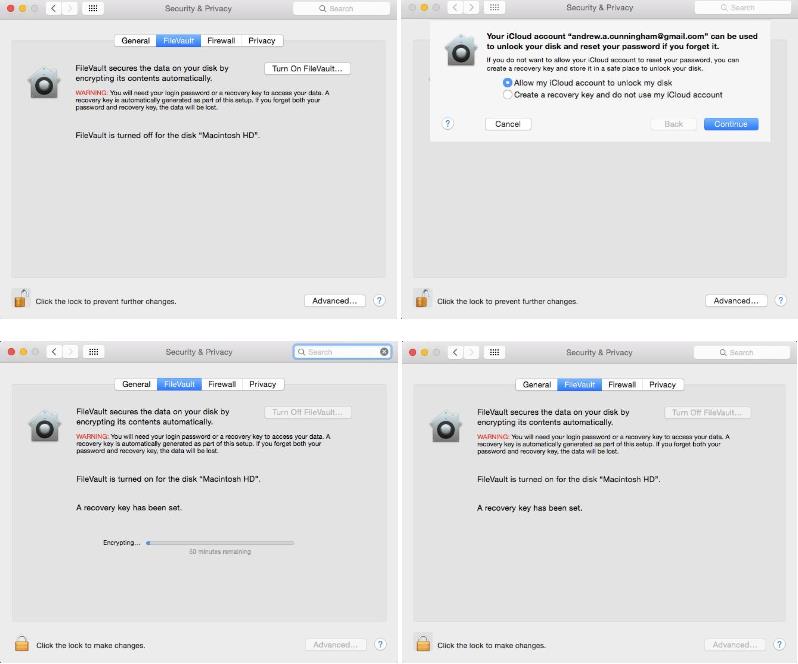
To encrypt your drive after the fact, go to the Security & Privacy pane in System Preferences, and select the FileVault tab. Click Turn On FileVault and you’ll be offered a pair of options: store the key used to unlock your disk somewhere yourself, or choose to store it in your iCloud account. A local recovery key keeps that key off of another company’s servers, but leaves you without recourse if you lose it and you’re locked out of your system. If you do store your key in iCloud (or even if you don’t, for that matter), we strongly recommend enabling two-factor authentication for your Apple ID.

Encrypting your disk doesn’t drastically change the way that OS X works—you just need to put your account password in to unlock the disk before the operating system boots instead of afterward. You’ll also need to specify which local users’ logins can decrypt the disk. Otherwise, just the account that enabled FileVault will be able to turn the machine on. If you ever need to decrypt your Mac, it’s pretty easy if you can log in to the computer or if you have the key available.

Generally speaking, performance for encrypted devices declines less for newer Macs with hardware acceleration—most Core i5s and i7s can do it, but Core 2 Duo Macs cannot.

Android

Phone and laptop encryption guide: Protect your stuff and yourself

Despite past promises, new Android devices still aren’t being encrypted by default. Default encryption is an option for OEMs, but outside of Google’s Nexus devices few if any companies are choosing to enable the feature on their phones.

You can still encrypt any relatively modern version of Android pretty easily—these specific steps work for Nexus devices or anything running near-stock Android, but the process should be similar if your phone is using a skin.

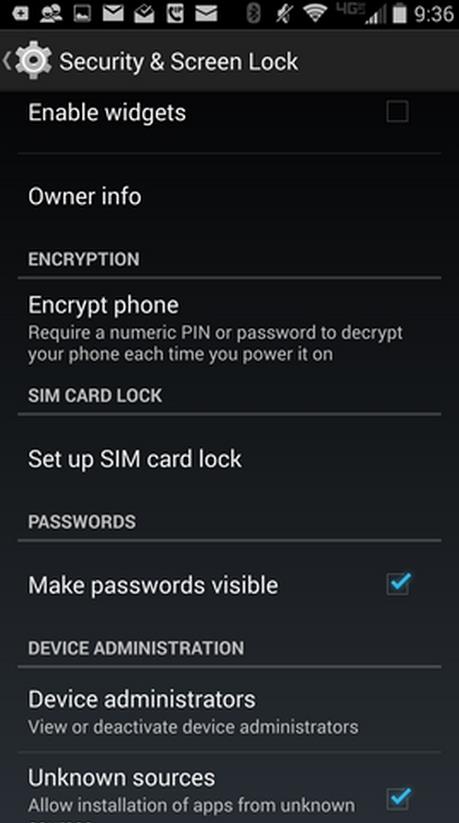
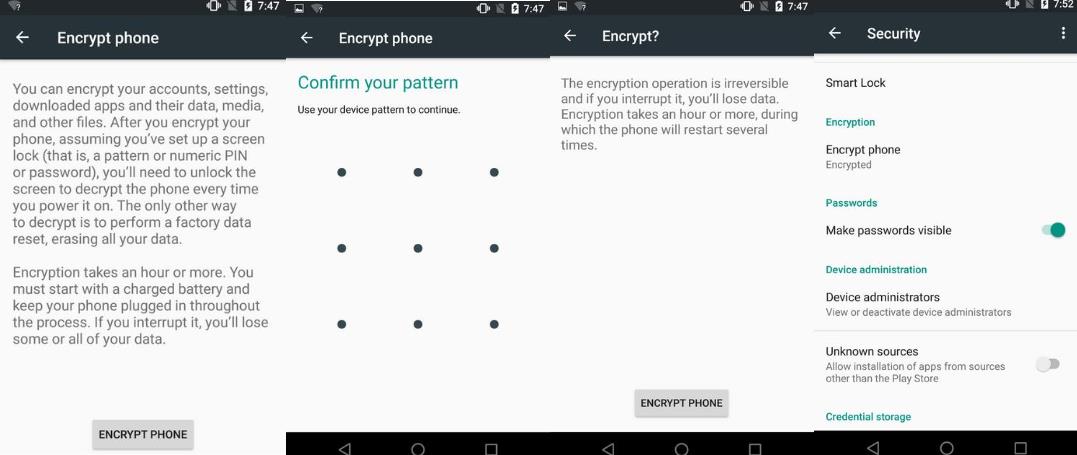
Open the Settings app, go to Security, and then tap “encrypt phone” to get the process started. Your phone may ask you to plug it in or charge the battery to a specific level before it will give you the option to encrypt, mostly because interrupting this process at any point is likely to completely corrupt your data partition. You’ll need to protect your phone with some kind of PIN or pattern or password if you haven’t already, and as in OS X your phone will probably require it before the operating system will boot.

To confirm that your phone was encrypted, go to Settings and then Security and look for a small “Encrypted” badge under the “Encrypt phone” menu item. If your phone already says it’s encrypted, you may have one of the new post-Lollipop phones that came with encryption enabled out of the box.

Depending on your phone, encrypting your Android phone or tablet can significantly impact performance. This is the worst for older or slower devices, which can use slower flash memory and filesystems and lack hardware encryption acceleration. The experience is better on newer phones with 64-bit ARMv8 processors and higher-end, faster storage.

Additionally, if you need to decrypt the device later on, there’s no way to do it without wiping and resetting the phone. If your phone came encrypted out of the box, though, there’s no way to decrypt the device without making more extensive software modifications.

Finally, in Android Marshmallow, the Android phones that include external storage are able to encrypt and protect the data on those cards as well as on internal storage.

Jeb Bush: encryption makes it too hard to catch “evildoers”

Jeb Bush: encryption makes it too hard to catch "evildoers"

Bush, the former governor of Florida, said Tuesday that encryption “makes it harder for the American government to do its job.”

That job would be, according to Bush, “making sure that evildoers aren’t in our midst,” echoing a phrase frequently used by his brother President George W. Bush to describe the threat of radical Islamic terrorism.

If you create encryption, it makes it harder for the American government to do its job – while protecting civil liberties – to make sure that evildoers aren’t in our midst.

Governor Bush’s comments were delivered at a forum hosted by a lobbyist group called Americans for Peace, Prosperity and Security (APPS) with close ties to military contractors, that is pushing presidential candidates to adopt “hawkish positions,” according to The Intercept.

(APPS’s advisory board includes members of what you might call the National Security establishment – including a former national security advisor to George W. Bush and a former CEO of BAE Systems. Its honorary chair is Mike Rogers, formerly the chairman of the US Congress’s Permanent Select Committee on Intelligence.)

Bush also advocated for wide latitude for the NSA to continue collecting phone metadata, although the NSA’s surveillance powers over Americans have been curtailed by Congress.

There’s “no evidence” that the NSA abused its powers or infringed on civil liberties of Americans, Bush said.

In fact, Bush said, in the clash of surveillance and civil liberties, “the balance has actually gone the wrong way” – meaning that civil liberties have too much weight.

There’s a place to find common ground between personal civil liberties and NSA doing its job. I think the balance has actually gone the wrong way.

While some US officials have advocated for technology companies to give law enforcement backdoors to read encrypted data, many security experts and tech companies say such a move would jeopardize security for everyone.

Others have pushed for some sort of middle ground, such as a multi-part encryption key that would keep encryption safeguarded by multiple agencies or companies holding part of the key.

Bush falls into this middle ground category, saying at the APPS forum that Silicon Valley companies (like Google and Apple) should cooperate with the government.

We need to find a new arrangement with Silicon Valley in this regard because I think this is a very dangerous kind of situation.

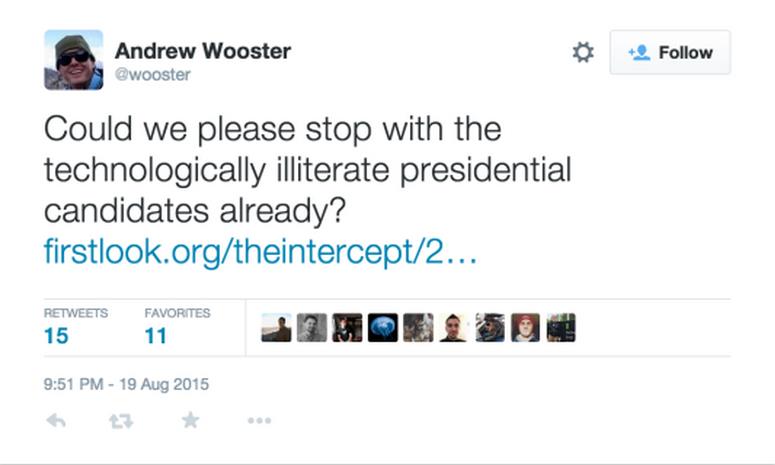
In response to Bush’s comments, some in tech and media suggested that Bush doesn’t really understand encryption.

Andrew Wooster, co-founder of a Seattle mobile software company, tweeted:

Jeb Bush: encryption makes it too hard to catch "evildoers"

The presidential politics of cybersecurity

As the 2016 US presidential election contest has heated up this summer, we’re reminded that cybersecurity isn’t just about technology, it’s also about policy – and that makes it highly political.

It’s still quite early in the election cycle, but cyber issues have taken up a good bit of the debate so far.

At a 6 August Republican debate, two contenders – Governor Chris Christie and Senator Rand Paul – clashed on NSA powers, with Christie claiming that the government needs “more tools” for fighting terrorism, and Paul arguing that the US Constitution requires a warrant for collecting data from Americans.

On the Democratic side, former Secretary of State Hillary Clinton has largely avoided the issue of NSA surveillance, while her chief rival, Senator Bernie Sanders, has called the NSA activities exposed by leaker Edward Snowden “Orwellian” and “clearly unconstitutional.”

Beyond encryption and surveillance, the cyberthreat from China has also taken up a lot of air time, with Republican candidates Mike Huckabee and Marco Rubio calling for retaliation against China over its presumed involvement in cyberattacks on the US government.

Clinton didn’t go as far as Huckabee or Rubio, but talked up the threat of Chinese economic espionage in a speech last month in which she also claimed that China wants to hack “everything that doesn’t move in America.”

A lot of important policies affecting privacy and security of Americans – and others around the world – will be decided by the next US president.

If you care about any of these issues – encryption, surveillance and the powers of law enforcement; privacy rights; government oversight of the internet and telecommunications; and laws that affect everything from data breach liability, to the rights of security researchers to hack things – it’s time to tune in and make your voice heard.

Five free Android encryption tools for the paranoid user

Do your hats tend to fall into the tinfoil range? Are you afraid there is always somebody watching you? If so, rest assured that the Android ecosystem offers plenty of apps to soothe your paranoia. But which apps are the must-haves? Here are five apps you should immediately install and put to work. They’ll bring you peace in the knowledge that your mobile data is far more secure than those around you.

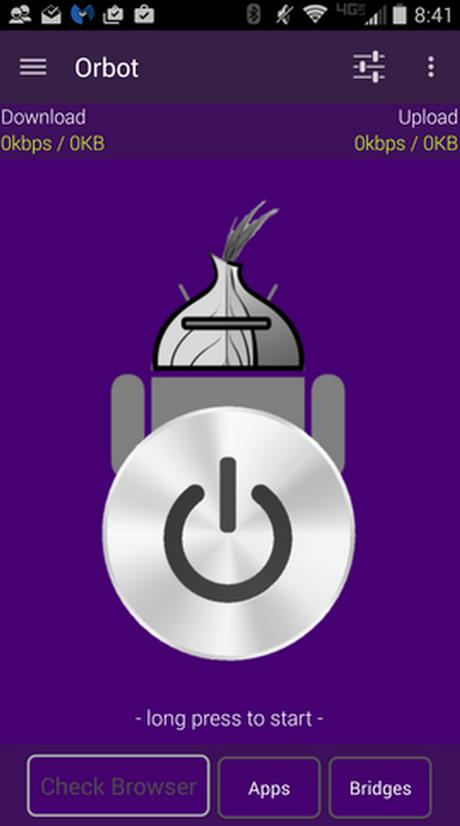
1: Orbot Proxy with Tor

Orbot Proxy with Tor (Figure A) is an open network that strives to prevent any form of data surveillance. Tor protects you by bouncing your communications around a distributed network run by volunteers around the globe. Not only does this help prevent prying eyes from spying on you as you use the internet, it also keeps sites from learning your physical location.

Figure A

Five free Android encryption tools for the paranoid user
To use Tor on Android, your best bet is Orbot Proxy with Tor. Once you have it installed and connected, it will encrypt all internet traffic leaving your device. This is the only app that produces a truly secure and encrypted connection for your Android device. If you are really paranoid, you need Orbot Proxy with Tor. It’s free… what do you have to lose?

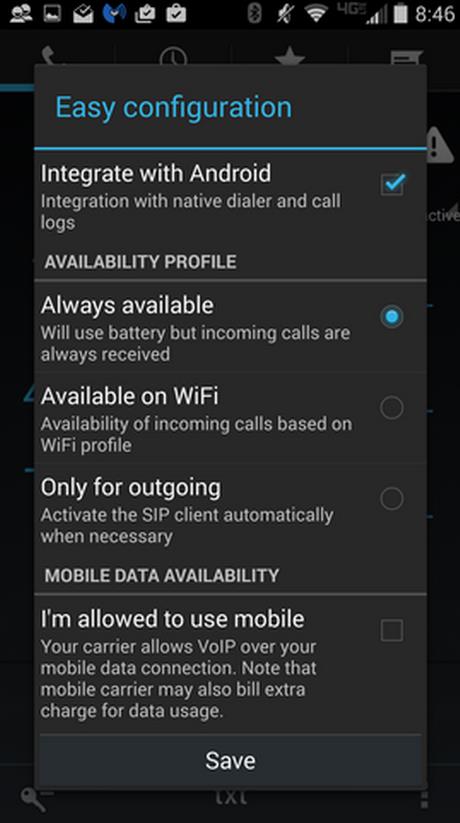
2: CSipSimple

CSipSimple (Figure B) lets you do encrypted SIP calling via your Android device. It’s open source and free, and it offers an easy-to-use Wizard for setting up the app. You are required to have an account on a SIP server, and I highly recommend using Ostel. It works seamlessly and has its own wizard for setting up the SIP account within CSipSimple. Even the Ostel account is free—so the only cost associated with this will be any data usage from your provider. You can set up CSipSimple to only use Wi-Fi, to avoid any charges whatsoever. CSipSimple uses rewrite/filtering rules to integrate with Android and allows you to record calls.

Figure B

Five free Android encryption tools for the paranoid user

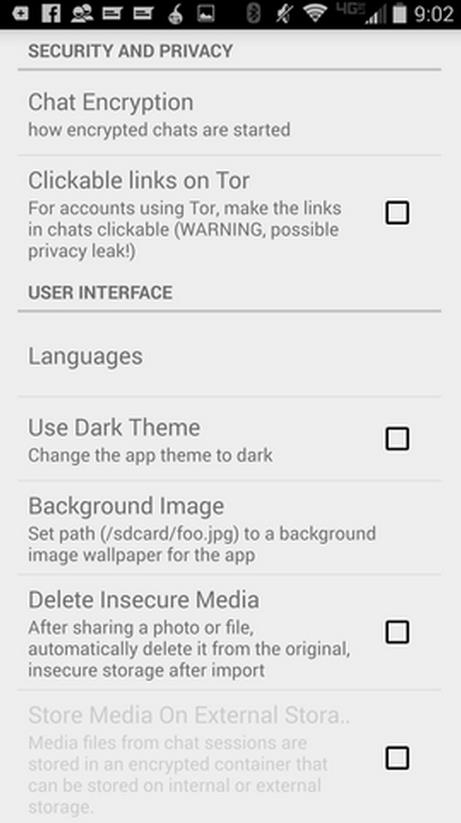
3: ChatSecure

ChatSecure (Figure C) offers free, unlimited encrypted chatting on your Android device. You can chat over Google Talk/Hangouts, Facebook Chat, Dukgo, Jabber, and more. ChatSecure claims 100% privacy using state-of-the-art Off the Record (OTR) encryption. If you’re concerned about ChatSecure being blocked, you can use it in conjunction with Orbot to circumvent all firewalls and monitors.

Figure C

Five free Android encryption tools for the paranoid user
With ChatSecure, setting up an OTR session is simple. When you start a chat with someone, you can first verify the contact and then start the encryption. This app isn’t perfect. You might run into instances where the encryption won’t start or the connection with Orbot isn’t made. But should either happen, you can restart the app and try again. It doesn’t occur often, but when you’re dealing with the need for 100% security, you don’t want to use the app without the aid of Tor.

4: K-9 Mail

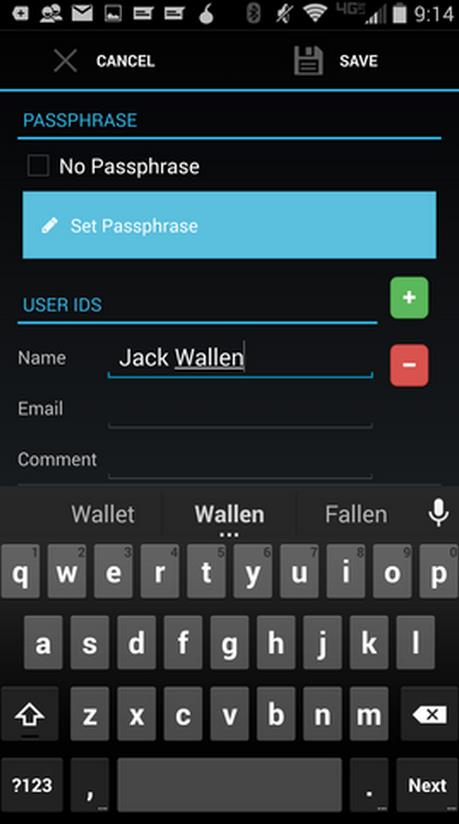
K-9 Mail with APG (Figure D) encrypts email on your Android device. You must install both apps and set up APG, which will create a key pair to be used by K-9. Once you’ve created your key pair in APG, set up K-9 and it will automatically detect that you have APG installed and offer the option to sign and encrypt an outgoing email with a simple tap of a check box. This is by far the easiest means of getting encrypted email on your Android device.

Figure D

Five free Android encryption tools for the paranoid user
One thing to remember is that all encryption keys are handled with APG—which lets you import keys created from other sources (even searching for public keys from key servers). Both apps are free. Use K-9 in conjunction with Tor and you’ll enjoy even more security.

5: Built-in device encryption

This option is for those who want to ensure the privacy of their device should it fall into the wrong hands. This built-in encryption system (Figure E) works with all data—including app data, downloaded files… everything on your device. Of course, this level of security does come with its drawbacks.

Figure E

Five free Android encryption tools for the paranoid user
First, older (or lower-end) devices might see a hit on the performance. (Newer and flagship devices shouldn’t so much as hiccup with system-wide encryption.) Second, you’ll have to enter the encryption password on every startup of the device—but that’s a small price to pay for this level of security. Pay it and be safe. Also understand that once you’ve encrypted your Android device, the only way to disable the encryption is to do a factory reset. Note: Android Lollipop defaults to device encryption.

Topping the list

Do you already feel more secure? You should. Each of these apps does a great job of keeping your data away from prying eyes. But if you only have time for one of these tools, I’d highly recommend Orbot Proxy with Tor. It will ensure all of your device traffic is routed through a far more secure network.

Pushbullet adds end-to-end encryption to its Android, Chrome and Windows desktop app

Pushbullet adds end-to-end encryption to its Android, Chrome and Windows desktop app

Continuing its evolution in to a full-fledged messaging service, Pushbullet has added support for end-to-end encryption when using the app to mirror notifications, move text captured by the universal copy and paste clipboard and send SMS messages.

The feature is available to anyone using the latest version of the company’s Android, Chrome or Windows desktop app; Pushbullet promises that its iOS and Mac apps will support the feature in the near future.

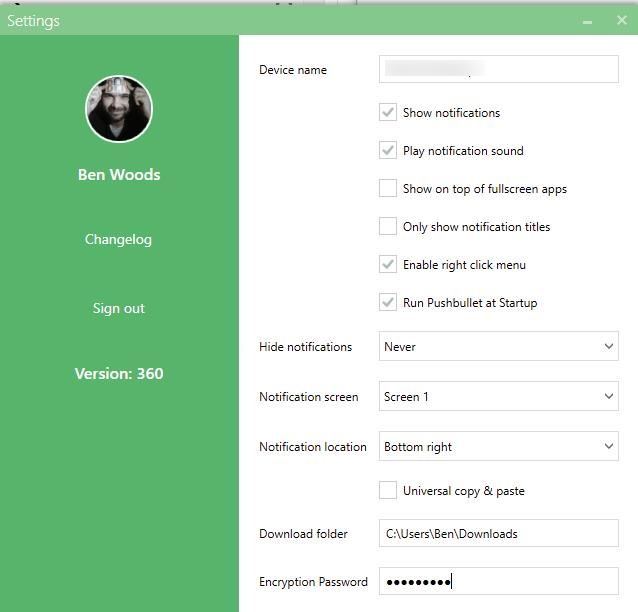
Enabling end-to-end encryption is done by going to the settings menu of each device you have Pushbullet installed on and inputing the same password.

Once it’s enabled, Pushbullet won’t be able to see the data you’re sending between your devices.

“End-to-end encryption means your data is encrypted before it leaves your device, and isn’t decrypted until it is received by another of your devices. This means we at Pushbullet only forward encrypted data. By setting up end-to-end encryption, you can be confident that your data is only readable when it’s shown to you,” says the company in a blog post. “The best part of all of this is that protecting your privacy doesn’t mean giving up features. Everything you love about Pushbullet still works great even with end-to-end encryption set up!”

Download Pushbullet from the Google Play Store and the iTunes App Store.

Pushbullet adds end-to-end encryption as it continues shift into messaging

Pushbullet adds end-to-end encryption as it continues shift into messaging

Pushbullet, once a simple tool for sending files between your various devices, has announced that it now supports end-to-end encryption for additional user privacy, as it continues its march towards becoming a fully-fledged messenger.

Announced in a blog post, the new encryption is applied across notifications that are mirrored between devices, any text captured by the universal copy-and-paste option and any SMS messages that are sent using the platform.

Pushbullet adds end-to-end encryption as it continues shift into messaging

Once enabled (achieved by entering a password on each device), it means that data passed using Pushbullet isn’t visible to the service itself or the company – only encrypted data is passed along.

To enter a password for end-to-end encryption, you just need to go to the settings menu on each device. Don’t forget your password though, there’s no record of it anywhere.

For now, the Pushbullet Android, Chrome and Windows desktop apps support the feature, but the company says that it’s working to bring it to iOS and Mac as “soon as possible.” Opera, Safari and Firefox support will then be added later.

While it’s a relatively small (but nonetheless important) feature for users, it’s essential for the future of the company if it’s intent on ploughing ahead into the messaging space.

Blackberry PGP Encrypted Phones With Latest BB12 Encryption Technology Released

Blackberry PGP Encrypted Phones With Latest BB12 Encryption Technology Released

Blackberry Encrypted Phones have Blackberry PGP email encrypted devices that offer safe and secure solutions for wireless communications.

Android and iPhones have proven to be unreliable when it comes to encryption and data protection. These popular devices have been relatively reduced to the status of toys when it comes to industrial or professional grade protection against espionage at any level. No one knows where the compromise begins and ends with these platforms whose very hardware was born with the idea of giving access to those who demanded it from certain levels.

The engineers at BBPGP.com have found that Blackberry PGP email encryption devices offer the highest level of security for wireless communications. This Blackberry PGP encryption technology allows for the highest encryption standards for email accounts. This encryption is done through BES servers.

The Blackberry PGP email encryption system is designed to be user friendly so that any level of user can conveniently protect their private information. This PGP encryption is available for private users or businesses who rely on security and privacy. It works by heavily encrypting all messages so that even if they were intercepted by a third party, it would be indecipherable.

Mark Spencer, Representative for BBPGP.com comments, “The Blackberry PGP email encryption devices is the most familiar way to communicate safely. This Blackberry PGP cryptofoons have been specially developed to communicate without the risk that the information sent by a third party, such as a government agency is intercepted safe. The Blackberry PGP encrypts the information, namely in such a way that even if this information is intercepted is nothing to do here.”

Because email is such an important communication system that is unfortunately an insecure way to transmit information, additional security measures are required to assure that privacy and sensitive information are protected. If messages are intercepted, without being automatically encrypted, personal information could become compromised. However, using technology such as the Blackberry PGP encryption from Blackberry Encrypted Phones assures that all messages are encrypted and only readable text for intended recipients. File attachments such as documents and images are also heavily encrypted for further privacy protection.

Email encryption is a process by where communications are completely scrambled to the point they are completely unreadable. The better the encryption, the less likely that a communication will be able to be deciphered. PGP email encryption offers a heavy level of this type of security.

Private users and businesses using wireless communication methods should make sure they have an additional layer of security due to how easy it is to breach the insecure wireless environment. PGP encryption acts like a high security envelope that shields communications from prying eyes of hackers, government institutions, competitors and others.

Cryptolocker virus: Australians forced to pay as latest encryption virus is ‘unbreakable’, security expert says

Cryptolocker virus: Australians forced to pay as latest encryption virus is 'unbreakable', security expert says

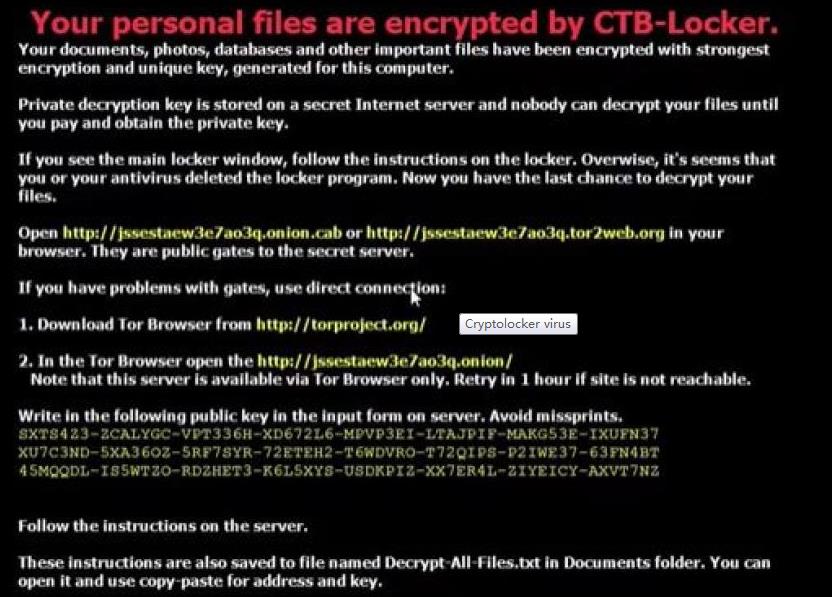
Australians are paying thousands of dollars to overseas hackers to rid their computers of an unbreakable virus known as Cryptolocker.

There has been a rise in the number of people falling victim to the latest version of an encryption virus which hijacks computer files and demands a ransom to restore them.

The “ransomware” infects computers through programs and credible-looking emails, taking computer files and photographs hostage.

Cryptolocker comes in a number of versions, the latest capitalising on the release of Windows 10.

It can arrive in an email disguised as an installer of the new operating system in a zip file.

IT technician Josh Lindsay said he had been repairing computers for 15 years but the current form of the virus was “unbreakable”.

“It’s definitely the worst I have come across,” he said.

The hackers offer computer owners a chance to retrieve data – but only if they pay a ransom using the electronic currency Bitcoin.

“If it’s on Bitcoin they can use it to purchase anything online from gold bullion, to shares, to property even and it’s virtually untraceable,” Mr Lindsay said.

Virus victim Renata Eugstar said she decided not to pay the ransom price.

“I just wouldn’t pay it out of principle, I suppose there are people out there that have to, you know, if it is a business,” she said.

Michael Bailey from the Tasmanian Chamber of Commerce and Industry said when his organisation was hit, a ransom equivalent to $US350 was paid to overseas hackers.

“It was cheaper for us to just pay rather than worry about trying to fix it,” he said.

“The advice from our IT people is – some of the best in Australia – was that it would take weeks for them to work out how to unencrypt the files, if they could at all.”

The deputy chairwoman of the Australian Competition and Consumer Commission, Delia Rickard, said over the past two months there had been a spike in the number of people falling victim to the scam.

The commission has received 2,500 complaints this year and estimates about $400,000 has been paid to the hackers.

“That’s the tip of the iceberg,” she said.

Thomas King, the general manager of the Australian Cyber Emergency Response Team (AusCERT) and part of the University of Queensland, said the number of computers infected by the virus was on the rise.

“Individuals, companies, not-for-profits, organisations of all kinds have paid and it’s a sad state of affairs that so many people do feel the need to pay because they don’t have good enough cyber security protections,” he said.

Mr King has urged people to take precautions when opening emails and to ensure good backups of any data is kept offline.


NSA-grade encryption for mobile over untrusted networks

NSA-grade encryption for mobile over untrusted networks

The only term being thrown around government more than “2016 elections” these days is “cybersecurity,” particularly following a rash of damaging and high-profile data breaches. With that focus on protecting information top of mind in agencies, USMobile officials hope to find a ready market for their commercial app, which lets government workers use their personal smartphones for top-secret communications.

Called Scrambl3, the app creates a secure virtual-private network that connects bring-your-own devices to an agency server to send messages using end-to-end encryption. Irvine, Calif.- based USMobile developed the Scrambl3 technology  when team members worked with the National Security Agency to create “Fishbowl,” a secure phone network available only to Defense Department users via the DOD Information Network.

“We’ve implemented Fishbowl in the form of a software-defined network, so all of those typical hardware components that you’d find in a mobile network — routers, VPNs, gateways, firewalls, proxy servers — all of those components are expressed or implemented in our system in the form of software,” said Jon Hanour, USMobile’s president and CEO. “We’ve made an affordable version of Fishbowl.”

When the turnkey solution comes to market in October, it will work with Android and Apple iOS devices. It uses the Security-Enhanced Linux operating system and a defense-in-depth approachThe layered approach uses a VPN connection with an encrypted VoIP call travelling within.When an agency deploys Scrambl3 Enterprise, administrators will set up what USMobile calls Black Books, or lists of contacts that each user can communicate with via the VPN.

“A lower-level person wouldn’t necessarily have the director of that particular agency listed,” Hanour said. “Conversely, the director of that particular agency would have [a] contact list populated with people that are at the higher levels of management.”

When a user logs into the app on a smartphone, it creates a VPN that connects to the agency’s server, whether it’s in the cloud or on premises. Currently, Scrambl3 Enterprise software is deployed only on IBM Power Systems Linux servers.

A two-rack server can handle up to 3,000 concurrent calls, Hanour said, a capacity “that would handle comfortably an agency of 50,000 people.”

Once connected, users can see who in their Black Book is also logged in, as indicated by a green dot next to the name, and then select the mode of communication: email, voice call or text. Both senders and recipients would need to have Scrambl3 installed.

“Once you establish this powerful VPN, you can run anything through it,” Hanour said. “Anything that you can put on a server, you can use Scrambl3 to communicate with.”

Calls are highly encrypted until they reach the recipient, where the app decrypts them. That communication happens at a top-secret-grade level as specified by NSA. Despite that encryption/decryption process, Hanour said, latency is unnoticeable.

For additional protection, nothing is recorded – users can’t even leave voicemail – unless an agency specifies otherwise. For instance, Hanour said, some law enforcement regulations require that all communication among officers be recorded.

The law enforcement community is a prime target customer for Scrambl3 because public cell phone networks don’t meet heightened police security standards, and photographic evidence requires a secure uploading process.

To use Scrambl3, agencies don’t need mobile device management systems, but it integrates with any that might exist.

“The advantage of this architecture is that the communication that the mobile device management software would typically have with the device, that communication can now run inside the VPN, so it makes that even more secure,” Hanour said. “It creates value for the mobile device management system as well because you can protect it inside the VPN.”

Licensing fees for Scrambl3 depend on the number of users, but typically start at $5 per user per month. The most it would cost, Hanour said, is about $10 per user per month.

Right now, Scrambl3 for Android is available in beta form in the Google Play Store for testing. Scramble3 for iOS will be available next month.

The beta version does not include all Scrambl3’s features, such as conference calling. When the release version is up and running in October, Scrambl3 will offer the only top-secret-grade conference call capability outside DOD’s network, Hanour said. Users will be able to initiate a conference call by touching a few people’s names and pressing the call button.

Besides law enforcement, Hanour sees potential customers in several types of government operations, including health care, the State Department when conducting diplomatic relations and even individual politicians, who might want to communicate in absolute privacy.

“The whole idea is to create trusted communications over untrusted networks (i.e., the Internet),” Hanour said.

Cloud encryption key management becomes table stakes

Cloud encryption key management becomes table stakes

Encryption key management has become table stakes for cloud vendors, but bringing your own key isn’t always the right move.

The ability to bring your own encryption keys is fast becoming ubiquitous in public cloud, but that doesn’t mean IT pros should retain control.

Security concerns and data center oversight are two primary hang-ups for IT shops averse to adopting public cloud. Amazon became the first major infrastructure as a service (IaaS) vendor to offer bring your own key encryption in 2014 as an answer to some of those critiques. Over the past few weeks, Microsoft and Google have also advanced their cloud encryption key management capabilities.

Vendors at every layer of the cloud stack have added encryption capabilities, and, eventually, all cloud vendors will offer some form of encryption and key management, said Garrett Bekker, senior security analyst with 451 Research LLC, based in New York. Some vendors will opt to do it natively, while others will pass the control to customers so they can check off that box on their list of capabilities, Bekker said.

“It comes down to how important it is for customers to control the keys,” Bekker said. “My guess is a lot of customers will be OK with letting service providers control the keys, but it depends on what the data is, what you’re using it for, and what industry and regulatory compliance you face.”

And business considerations will affect vendor services, too, with a company such as Google that lags in the market offering key management for free. Other companies like Salesforce.com that need to generate new revenue streams offer native encryption as a premium service.

To key or not to key?

Encryption is considered central to data protection in the cloud, but who should retain its control?

SunGard Financial Systems, which partners with Google to build a big data processing prototype for the U.S. Securities and Exchange Commission, uses Customer-Supplied Encryption Keys for compute resources on Google Compute Engine. The free tool for bringing your own keys became available in beta last week, and it’s essential from a risk and regulatory control perspective for this project, said Neil Palmer, CTO at SunGard Consulting Services, based in Wayne, Pa.

All data in the cloud should be encrypted anyway, but the ability to bring your own keys is one of those additions that should help enterprise adoption and increase the ways those customers use public cloud, Palmer said. Still, SunGard doesn’t bring its own keys to every project, so it’s a matter of weighing if and when key management is the best fit.

“It’s just a question from a perspective of effort, time, integration, etc.,” Palmer said. “There’s a return on investment around key management required, so if you’re BuzzFeed or one of the big media Internet sites, maybe not so much. But if you’re healthcare or government work, you may need it.”

Microsoft Azure Key Vault, which became generally available last month, can be used as a standalone service and allows customers to import keys from their own hardware security modules (HSMs). Microsoft charges $0.03 per 10,000 operations for software-protected keys and an additional $1 per month per key for HSM protected keys.

Similarly, Amazon Web Services (AWS) Key Management Services charges $0.03 per 10,000 requests and $1 per month per each key that is created and active. Amazon also has CloudHSM, a dedicated HSM appliance that costs $5,000 for each instance, in addition to an hourly fee of $1.88 for as long as the instance is running.

Cloud encryption key management is difficult, and bringing your own keys to a service someone else owns is a non-trivial endeavor that goes against one of the cloud’s main advantages of not having to worry about these sorts of things, said Adrian Sanabria, senior security analyst at 451 Research.

“You’ve got to somehow own the keys and manage to inject them into workloads without exposing them to the cloud provider,” Sanabria said. “It is a compromise, where you can’t be 100% cloud if you want to manage your own keys.”

Public perception about cloud security and regulatory environments with antiquated requirements both play a role for the need for key management, but the point could be moot in five years’ time, as customers start to trust large public cloud providers as good stewards of keys, said Leonard Law, a product manager for Google Cloud Platform.

“As people are transitioning from on-premises to the cloud, there’s this notion of control. So by managing your own custom keys that gives customers a lot of peace of mind, but ultimately, it’s just less necessary,” Law said.